
The tow truck is 90 minutes away
If it picks up at all. Roadside assistance is a call centre, a queue, and a vehicle dispatched from somewhere across the city — for a job that is often five minutes of someone's time.
Flat tyre at midnight. Out of fuel on the highway. A breakdown somewhere with no garage for 20 km. Help Chain alerts the people already around you who chose to be on duty, matches the first one who accepts, and keeps you both on a live map with chat until you're moving again.
Help Chain
Screenshot goes here/screens/hero-home.jpeg
Almost nothing that strands a person on an Indian road needs a specialist. It needs somebody who is already close, and a way to tell them.
If it picks up at all. Roadside assistance is a call centre, a queue, and a vehicle dispatched from somewhere across the city — for a job that is often five minutes of someone's time.
There are almost certainly people around you with a spare can of fuel, a jack, a jumper cable, or just a working pair of hands. You have no way to reach any of them, and they have no idea you exist.
Calling contact after contact costs battery, daylight, and nerve. Every minute standing on a shoulder in the dark is a minute you did not choose to spend there.
Most people will help a stranger with something small. They drive past because nobody told them. Willingness is not the missing piece; a signal is.
Help Chain closes that gap. One tap turns your situation into a notification on the phones of people who are near you right now and have said they are willing to come.
Five steps, and you only actively do two of them.
Help Chain
Screenshot goes here/screens/track.png

Pick a category, drop the exact spot on the map, and add a photo or a voice note if it is easier than typing. It takes seconds, which matters when you are standing on a shoulder.
Accident · Breakdown · Out of Fuel · Flat Tire · Anything else
Everyone on duty within range is notified — including with the app closed and the phone locked. Being on duty is a switch a helper turns on deliberately; nobody is pinged by surprise.
Push, foreground and background
One person gets the job. The slot is claimed the instant it is accepted, so you do not end up with four people converging on you and three of them wasting a trip.
One request, one helper
Both pins move in real time, with live distance and ETA. Chat is right there for the details a pin cannot carry — photos, a voice message, or a pinned location if the map is a few metres off.
Live tracking · chat · shared location
Mark it done, leave a rating and a review, and the helper earns points for it. If anything went wrong, report it from the chat — that preserves the records so it can be investigated.
Ratings · reviews · reports
A help app is only as good as the notification that arrives when the phone is in someone's pocket. Most of the engineering here went into that.
You are only reachable as a helper while the duty toggle is on. Turn it off and you stop being notified, stop appearing on the map, and stop sharing anything.
Duty runs as an Android foreground service with a watchdog that restarts it if the system kills the app. A helper who pocketed their phone twenty minutes ago is still reachable.
During a help session both people move on each other's map, with live distance and ETA. The helper routes to where you are now, not to where you were when you posted.
Text, photos, voice notes, video, and documents — plus a location pin you can send in chat when the map is a few metres off from where you actually are.
A phone number and a one-time password. That is the whole account, and it is the only identity claim the app makes about anyone.
Rate and review after every completed help. Report from the chat screen if something went wrong — that preserves the records so it can be looked into properly.
Every completed help earns points, weighted by category — an accident is worth more than a fuel run. They add up on your profile and on the leaderboard.
Location is collected in exactly two states: while you are on duty, and while you have an open request. Neither one is true by default.
Five categories. The number is what a helper earns for completing one.
Photo & voice note optional
Help Chain
Screenshot goes here/screens/home.png

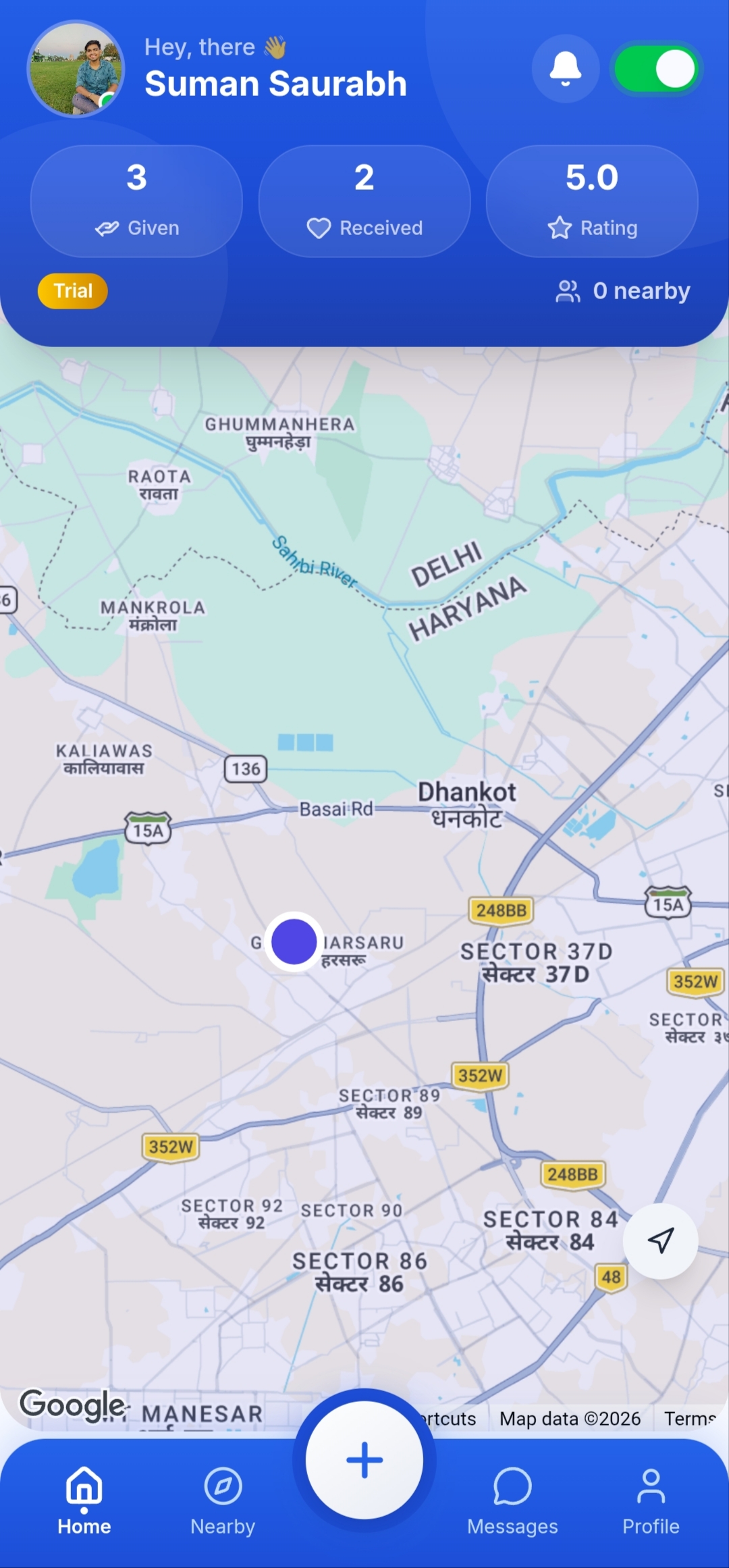
Open requests around you, and the duty toggle that decides whether you are reachable.
Help Chain
Screenshot goes here/screens/create-request.png

Category, location, and an optional photo or voice note. No forms to fill out standing on a road.
Help Chain
Screenshot goes here/screens/chat.png

Text, images, voice notes and a shareable location pin, for the last hundred metres a map cannot describe.
Help Chain
Screenshot goes here/screens/profile.png

Helps completed, rating, reviews and points — the only reputation anyone on Help Chain has.
An app that connects strangers for in-person help has to be honest about what it can and cannot promise. Here is the short version; the full version is in the Privacy Policy and the Terms, and both are linked from every card.
Verifying a number proves someone controls that number. It says nothing about who they are, whether they are competent, or whether they are safe. You are meeting a stranger — treat it that way, and decline if you are not comfortable. Declining costs you nothing.
Terms, section 4While you are on duty, and while you have an open help request. Outside those two states nothing is collected. Going off duty, or completing or cancelling the request, stops it immediately — as does revoking the permission in Android settings.
Privacy Policy, section 1.3Sessions end, notifications stop, your name and photo disappear from the app immediately. Thirty days later the requests, chats, reviews and uploads are permanently deleted. Signing in during that window brings everything back.
Privacy Policy, section 4It is not sold, and it is not used for advertising or ad profiles. It is shared with one person — the user you are matched with — for the length of one help session.
Privacy Policy, section 3Help Chain is not an emergency service, a roadside assistance service, a medical service, or a towing service, and it must never be used in place of one. In an emergency in India, dial 112.
Every account starts on a free trial. Nothing is charged for answering someone else's request, ever.
₹0for 7 days
Applied automatically when you sign up. No card, no checkout.
₹100for 30 days
For anyone who is on the road often enough that a cap would be the thing that fails them.
Freealways
Go on duty, get notified, accept what you can actually do. No plan is required and none ever will be.
Prices are shown at the point of purchase and processed by a third-party payment provider. Coins and subscription fees are non-refundable unless the law requires otherwise — see Terms, section 9.
Still unclear about something? Write to connect.helpchain@gmail.com.
Nothing is guaranteed. Help Chain notifies the people who are on duty near you, and any of them can decline or ignore it — they are volunteers, not dispatched staff. If a request goes unanswered you can cancel it and fall back on a professional service. This is why the app is not, and must never be treated as, an emergency service.
No. Location is collected in exactly two states: while you are on duty as a helper, and while you have an open help request. Outside those, nothing is collected. Going off duty, or completing or cancelling your request, ends it straight away.
Because a helper whose phone is in their pocket still needs to be findable, and a stranded requester still needs their helper to be able to reach them. Android calls that permission “Allow all the time”. It is used for those two cases only, and for nothing else.
No. We verify that a person controls the phone number they signed up with, and nothing beyond that — no background check, no ID check, no licence check. Ratings and reviews come from other users and are not verified by us. Judge each situation yourself, and decline anything you are not comfortable with.
Duty runs a location service, so it costs more than an idle app. It updates roughly every 25 seconds while idle and more often during an active help, and it stops completely the moment you go off duty. Duty is opt-in for exactly this reason.
Yes, from Profile → Delete Account inside the app. The account closes immediately and the data is permanently deleted 30 days later. Signing in during those 30 days restores it in full. You cannot delete while you are mid-help — cancel or complete it first, so nobody is left waiting on you.
Not today. Help Chain is Android-first, because the background location and notification behaviour it depends on is what the Android build was engineered around. The web version is browse-and-manage only.
Report the user from the chat screen — that preserves the records for investigation — and write to connect.helpchain@gmail.com. If a crime has been committed, contact the police: in India, dial 112. Contacting us is not a substitute for contacting the authorities.
Install it before you need it — an app downloaded on the hard shoulder is an app downloaded too late. And if you are usually the one who stops anyway, turn duty on and let the people around you find you.
Android · com.helpchain.app